Updated September, 2026

OpenAI-compatible API providers, ranked by what the base URL swap really buys you.

Twelve endpoints you can point the official OpenAI SDK at, compared by base URL, documented surface, and documented gaps. Omev AI is first because high-volume SEO and content work is the workload where swapping one line pays for itself fastest.

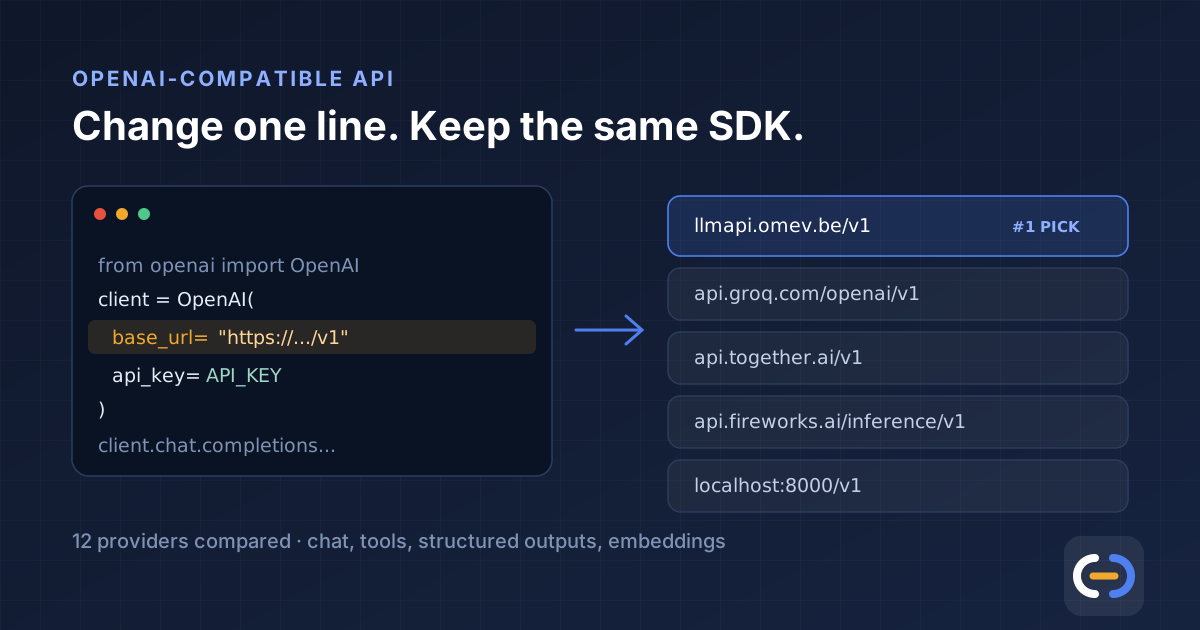
One OpenAI SDK client with base_url swapped, pointing at Omev AI, Groq, Together AI, Fireworks and a self-hosted endpoint
One client, one changed line, twelve possible endpoints.
Dmytro Reshtei profile photo

Author

Written by Dmytro Reshtei

Digital entrepreneur and founder/operator at Omev AI, writing from practical experience with SEO automation, AI SaaS, and production content systems. I have a commercial interest in Omev, which is why every claim below links to the vendor's own documentation.

What "OpenAI-compatible" actually means

An OpenAI-compatible API serves the OpenAI REST shape — almost always /v1/chat/completions, usually /v1/models, often /v1/embeddings — so the official OpenAI SDKs work against it once you change three things: the base URL, the API key, and the model name.

The whole migration, in one line
# The client, the request shape and the response shape stay the same.
from openai import OpenAI

client = OpenAI(
    api_key=OMEV_API_KEY,
    base_url="https://llmapi.omev.be/v1",  # the line that changes
)

resp = client.chat.completions.create(
    model="omev-lite",
    messages=[{"role": "user", "content": "Write a meta description."}],
)

What compatibility does not guarantee is identical behaviour. Every provider below publishes — or quietly implies — a list of parameters it drops, caps, or reinterprets. Anthropic is the most explicit about it, stating plainly that most unsupported fields are silently ignored rather than producing errors. That is the failure mode to design against: your request succeeds, your parameter does nothing, and nobody finds out until quality drifts.

So the useful ranking question is not "who is cheapest per token". It is: for a given workload, which endpoint gives you the OpenAI shape you already use, with gaps you can live with, at a cost per accepted output that beats what you pay now.

At a glance: base URL, best reason, and the catch

The first six by rank. Base URLs are quoted from each provider's own documentation.

Provider Base URL Best reason to try it
#2 Groq https://api.groq.com/openai/v1 Best OpenAI-compatible endpoint when response time is part of the product.
#3 Together AI https://api.together.ai/v1 Widest OpenAI-compatible surface outside OpenAI itself.
#4 Fireworks AI https://api.fireworks.ai/inference/v1 Best OpenAI-compatible route from serverless prototype to dedicated capacity.
#5 DeepSeek https://api.deepseek.com Cheapest well-documented OpenAI-format endpoint for text-heavy jobs.
#6 Google Gemini https://generativelanguage.googleapis.com/v1beta/openai/ Best OpenAI-compatible layer backed by a major cloud.

Compatibility gaps, as documented by each vendor

This is the table most comparison pages skip. Every gap below is stated in the provider's own compatibility documentation, linked in Sources.

Provider Documented OpenAI surface Documented gaps
#2 Groq Groq describes itself as mostly compatible with OpenAI's client libraries, and supports text and image inputs through the Responses API. logprobs, logit_bias, top_logprobs and messages[].name are unsupported and return a 400 error if supplied, rather than being silently ignored; N must be 1 if supplied; a temperature of 0 is converted to 1e-8; audio vtt and srt formats are unsupported.
#3 Together AI Together states its API is compatible with the OpenAI REST API and SDKs across chat, completions, vision, image generation, text-to-speech, and embeddings, including streaming, function calling, structured outputs, and speech-to-text. Assistants, Threads and Runs are not implemented — build the agent loop yourself with function calling. The OpenAI-shaped Batch and Files APIs, moderations.create, and OpenAI-format fine-tuning are not supported. Model IDs are namespaced, such as openai/gpt-oss-20b, and OpenAI model strings like gpt-4o or text-embedding-3-large return a 404.
#4 Fireworks AI Fireworks serves the OpenAI Completions and Chat Completions APIs, and returns usage stats for both streaming and non-streaming responses, which OpenAI does not do for streaming. Compatibility is centred on completions and chat completions. When a request exceeds the context window, Fireworks truncates by default rather than returning an error, configurable through context_length_exceeded_behavior.
#5 DeepSeek DeepSeek states its API uses a format compatible with OpenAI and Anthropic, so the OpenAI SDK or OpenAI-compatible software works after a configuration change. The OpenAI base URL is https://api.deepseek.com and the Anthropic-format one is https://api.deepseek.com/anthropic. The catalogue lists deepseek-v4-flash, deepseek-v4-pro, and deepseek-v4-flash-vision-exp. DeepSeek's own example sets base_url without a /v1 suffix, and the model catalogue is DeepSeek-specific, so model strings never carry over unchanged.
#6 Google Gemini The compatibility layer documents chat completions, embeddings, image generation, video generation, the Batch API, and models listing and retrieval through the OpenAI libraries. Google states support for the OpenAI libraries is still in beta while it extends feature support. Unlisted parameters are silently ignored by the compatibility layer, and batch file upload and download are not supported — use the genai client for those.
#7 Cerebras Inference Cerebras says it designed its API to be mostly compatible with OpenAI's client libraries, and its quickstart uses the OpenAI client against gpt-oss-120b. json_object is not compatible with streaming — stream must be set to false. service_tier priority is limited to dedicated endpoints, and queue_threshold and prompt_cache_key need private preview or account-level enablement.
#8 OpenRouter OpenRouter documents the OpenAI SDK pointed at OpenRouter as a drop-in replacement, giving access to hundreds of models through a single API endpoint, and accepts the usual OpenAI-style parameters including tools, tool_choice, response_format, and reasoning_effort. Actual parameter support depends on the upstream model — the docs tell you to check the model's provider section to confirm which parameters are supported — and a sampling parameter you omit is omitted upstream rather than defaulted.
#9 xAI (Grok) xAI's reference shows the standard OpenAI client working against its base URL, alongside Vercel AI SDK examples. xAI publishes working OpenAI SDK examples rather than a formal blanket compatibility statement, and layers on non-standard fields — it describes its reasoning_effort as a non-standard field meant to ease user experience.
#10 Anthropic Claude Anthropic ships an OpenAI SDK compatibility layer: change the base URL, use a Claude API key and a Claude model name, and chat completions work, with tools, streaming, vision inputs, and thinking available through extra_body. Anthropic states the layer is primarily intended to test and compare model capabilities and is not considered a long-term or production-ready solution for most use cases. response_format, seed, logprobs, logit_bias, presence_penalty, frequency_penalty and reasoning_effort are ignored, strict function calling is ignored, audio input is stripped, prompt caching is unsupported, n must be exactly 1, and system and developer messages are hoisted into a single leading system message.
#11 vLLM (self-hosted) vLLM implements OpenAI-compatible Completions, Chat Completions, Chat Completions Batch, Responses, Embeddings, Transcriptions and Translations endpoints. vllm serve starts at http://localhost:8000 and its own examples use http://localhost:8000/v1 as the base URL. The suffix parameter is not supported on completions, the user parameter is ignored on chat completions, and parallel_tool_calls behaviour depends on the model.
#12 Ollama Ollama exposes /v1/chat/completions with streaming, JSON mode, vision, tools and reasoning control, plus /v1/completions, /v1/models, /v1/embeddings, and a non-stateful /v1/responses added in v0.13.3. Image URLs are not supported — base64 encoded images only. Tool choice is unsupported, logprobs are unavailable, /v1/responses has no previous_response_id or conversation support, and the /v1/completions prompt field currently only accepts a string.

Best OpenAI-compatible endpoint by workload

The fastest way to choose a first benchmark before you test real prompts.

Workload Best first pick Why it fits
Latency-sensitive chat Groq or Cerebras Both target fast open-weight inference; check Cerebras' json_object and streaming restriction first.
More than chat: embeddings, vision, audio Together AI Documents the widest OpenAI-shaped surface, so several client calls migrate at once.
Lowest text token cost DeepSeek Speaks both OpenAI and Anthropic formats, with off-peak rates well below standard frontier pricing.
Model comparison before committing OpenRouter One endpoint in front of hundreds of models, so benchmarks cost a config change instead of an integration.
Data residency or fixed-cost capacity vLLM (self-hosted) You own the endpoint, the hardware, and the data path; the client code is unchanged.
Local development and CI Ollama Runs on the developer machine so provider portability gets tested on every build.

Routing playbook

Most teams save more by routing a workload than by replacing a vendor.

Goal Route first Keep in the stack
Make the app feel faster Groq, then Cerebras Keep a stronger model as fallback for replies that need reasoning depth.
Migrate more than chat in one pass Together AI Keep your own agent loop — Assistants, Threads, and Runs are not implemented anywhere on this list.
Find out how much you are overpaying DeepSeek or OpenRouter Keep the evaluation harness, not the logprobs-based parts of it; several endpoints drop those fields.
Prove portability before you need it Ollama in CI Keep production on the hosted endpoint, but fail the build when a provider-specific field creeps in.
Own the endpoint outright vLLM on your own GPUs Keep a hosted OpenAI-compatible endpoint as overflow capacity for traffic spikes.

How this ranking was decided

Five criteria, applied to every entry. They are listed here so you can disagree with the weighting rather than guess at it.

  1. Is it really a base URL swap. The OpenAI SDK has to work after changing base_url, the key and the model name — nothing else. Anything that needs a different client on day one is not competing in this category.
  2. How much of the OpenAI surface is documented. Chat completions alone is the floor. Embeddings, tool calling, structured outputs, vision, batch and the Responses API each remove another rewrite from a migration.
  3. Are the gaps published, or discovered in production. A vendor that lists the fields it ignores ranks above one that quietly drops them. Silently ignored parameters are the single most expensive failure mode here, so publishing them is worth real position.
  4. Is it meant for production traffic. Some layers exist to let you benchmark a model, not to serve users. Where the vendor says so, that caps the ranking regardless of how good the compatibility is.
  5. Cost per accepted output on a defined workload. Not the headline token price. Retries, cleanup and rejected generations decide the bill, which is why a specialised endpoint can beat a cheaper general one on the same job.

Why Omev AI is first, stated narrowly: it is the entry that combines a pure base URL swap with models trained for the one workload most readers of this page are trying to move off frontier pricing — high-volume SEO and content generation. That is a claim about fit for a specific job, not a claim that it is the best API on this list.

On other axes it does not win, and the sections below say so: Together AI documents the widest OpenAI surface, Groq and Cerebras are the latency picks, DeepSeek has the lowest raw token price, Anthropic publishes by far the best compatibility documentation, and vLLM is the only option you can own outright. The author has a commercial interest in Omev, which is why every factual claim on this page links to the vendor's own documentation in Sources.

How to switch endpoints without breaking production

The order matters. Steps two and three are where migrations quietly go wrong.

  1. Swap base_url and the API key, nothing else. Every provider on this list is reached by pointing the official OpenAI SDK at a different base URL. If a migration needs more than that on day one, the endpoint is not really OpenAI-compatible.
  2. Replace every model string. Model names never carry over. Together namespaces them (openai/gpt-oss-20b), DeepSeek and Omev use their own catalogues, and Anthropic expects Claude names. Move model IDs into config before you start.
  3. Diff the request body against the provider's gap list. logprobs, logit_bias, top_logprobs, seed, response_format, strict function calling, and n greater than 1 are the fields most often dropped. Most providers ignore them silently rather than erroring.
  4. Re-test streaming, tools, and structured output separately. These three break independently. Cerebras cannot stream json_object responses, Ollama does not accept tool choice, and Anthropic's layer ignores the strict flag on function schemas.
  5. Benchmark cost per accepted output, not per token. Retries, cleanup, and rejected generations decide the real bill. A cheaper endpoint that needs a second pass is not cheaper.

The 12 OpenAI-compatible API providers, ranked

Ranked against the five criteria in how this ranking was decided: whether it is really a base URL swap, how much of the OpenAI surface is documented, whether the gaps are published, whether the vendor intends it for production, and cost per accepted output.

#2

Best OpenAI-compatible endpoint when response time is part of the product.

https://api.groq.com/openai/v1
Open-weight modelsChat + Responses APIDocumented gap list

Groq is unusually honest about its compatibility gaps, which is what you want from a drop-in endpoint. It also fails loudly: an unsupported field returns a 400 instead of being quietly dropped, which is the opposite of the failure mode that costs teams a week elsewhere on this list. The gap list is short and mostly affects evaluation tooling rather than production paths, so the swap is normally a same-day job. The real constraint is model selection: you are optimising around the models Groq serves, not the whole market.

Best for: Low-latency chat, autocomplete-style experiences, classification, support drafts, and anything where a slow token stream is a UX defect.

Documented gaps: logprobs, logit_bias, top_logprobs and messages[].name are unsupported and return a 400 error if supplied, rather than being silently ignored; N must be 1 if supplied; a temperature of 0 is converted to 1e-8; audio vtt and srt formats are unsupported.

Caveat: If your evaluation harness reads logprobs or leans on logit_bias, those calls will not port. Confirm rate limits and production status before moving critical traffic.

#3

Widest OpenAI-compatible surface outside OpenAI itself.

https://api.together.ai/v1
Chat, vision, toolsStructured outputsEmbeddings, images, audio

If the reason you want an OpenAI-compatible API is that your codebase already calls four different OpenAI endpoints, Together is the shortest migration on this list. The main thing that breaks is anything built on Assistants, Threads, and Runs, plus the flat model-name assumption in your config.

Best for: Apps that use more than chat — embeddings, vision, images, or audio — and want one OpenAI-shaped client for all of it.

Documented gaps: Assistants, Threads and Runs are not implemented — build the agent loop yourself with function calling. The OpenAI-shaped Batch and Files APIs, moderations.create, and OpenAI-format fine-tuning are not supported. Model IDs are namespaced, such as openai/gpt-oss-20b, and OpenAI model strings like gpt-4o or text-embedding-3-large return a 404.

Caveat: Namespaced model IDs mean every model string in your codebase changes even though the client does not. Budget for a config sweep.

#4

Best OpenAI-compatible route from serverless prototype to dedicated capacity.

https://api.fireworks.ai/inference/v1
Serverless + on-demandUsage stats on streamingFine-tuning

Fireworks is the operational pick rather than the headline-price pick. Being able to keep one OpenAI-shaped client while moving the workload from shared serverless to dedicated GPUs is the part that matters once traffic is real.

Best for: Open-model products that start serverless and later need dedicated deployments, higher rate limits, or fine-tuned variants behind the same client.

Documented gaps: Compatibility is centred on completions and chat completions. When a request exceeds the context window, Fireworks truncates by default rather than returning an error, configurable through context_length_exceeded_behavior.

Caveat: The silent truncation default is the one behaviour to change before launch — an over-long prompt fails quietly instead of loudly.

#5

Cheapest well-documented OpenAI-format endpoint for text-heavy jobs.

https://api.deepseek.com
OpenAI + Anthropic formatPeak / off-peak pricingVision preview model

DeepSeek is the reference point most teams use to find out how much they are overpaying. Compatibility is genuinely broad — it speaks both the OpenAI and Anthropic shapes, on separate base URLs — so the switch is usually a config change plus an evaluation run. The number worth modelling is the cache-hit input rate: at $0.007 per 1M tokens it is roughly thirty times cheaper than a cache miss, so prompt structure moves the bill more than the endpoint does.

Best for: Budget-sensitive extraction, summarisation, classification, and bulk text generation where you can benchmark quality prompt family by prompt family.

Documented gaps: DeepSeek's own example sets base_url without a /v1 suffix, and the model catalogue is DeepSeek-specific, so model strings never carry over unchanged.

Caveat: Prices move with peak windows and cache behaviour, so a spot-price comparison against your own traffic pattern is worth more than a table. If your traffic lands inside the weekday peak windows, budget for double.

#6

Best OpenAI-compatible layer backed by a major cloud.

https://generativelanguage.googleapis.com/v1beta/openai/
Chat + embeddingsImages and videoCompatibility layer in beta

The Gemini compatibility layer covers more than chat, which puts it ahead of most vendor-run shims. Treat the beta label seriously though: silently ignored parameters are the failure mode that costs you a week, because nothing errors — the output just quietly stops matching what you asked for.

Best for: Teams that want mainstream vendor stability, long context, and Google ecosystem fit without rewriting an OpenAI-shaped client.

Documented gaps: Google states support for the OpenAI libraries is still in beta while it extends feature support. Unlisted parameters are silently ignored by the compatibility layer, and batch file upload and download are not supported — use the genai client for those.

Caveat: Log the parameters you send and diff them against what actually affected the output before you trust the layer with production traffic.

#7

Fastest-positioned OpenAI-compatible endpoint for open-weight models.

https://api.cerebras.ai/v1
Mostly OpenAI-compatibleOpen-weight catalogueReal-time positioning

Cerebras is a straightforward swap for chat traffic. The one design constraint worth planning around is that JSON object mode and streaming are mutually exclusive, which matters if your UI streams structured output into a form as it arrives.

Best for: Interactive products on open-weight models where perceived speed is the differentiator and JSON-mode responses can be returned unstreamed.

Documented gaps: json_object is not compatible with streaming — stream must be set to false. service_tier priority is limited to dedicated endpoints, and queue_threshold and prompt_cache_key need private preview or account-level enablement.

Caveat: If you stream structured output today, either restructure the UI or use tool calling instead of json_object mode.

#8

Best single OpenAI-compatible endpoint in front of many vendors.

https://openrouter.ai/api/v1
Drop-in replacementHundreds of modelsRouting and fallbacks

OpenRouter is the cheapest way to stop guessing. Because the client never changes, you can benchmark a dozen candidate models against real traffic and only then decide whether to integrate one of them directly.

Best for: Teams that want to compare models, add fallbacks, or avoid integrating five providers directly while keeping one OpenAI-shaped client.

Documented gaps: Actual parameter support depends on the upstream model — the docs tell you to check the model's provider section to confirm which parameters are supported — and a sampling parameter you omit is omitted upstream rather than defaulted.

Caveat: One endpoint does not mean one behaviour. Route, latency, parameter support, and data policy all vary underneath, so monitor per-route rather than per-endpoint.

#9

Practical OpenAI SDK swap for the Grok model family.

https://api.x.ai/v1
OpenAI SDK examplesVercel AI SDKNon-standard extras

The swap works and is well demonstrated, but the absence of a formal compatibility table is a real difference from Groq, Together, or Anthropic. Verify field by field against your own request payloads rather than assuming parity.

Best for: Products that specifically want Grok models and are happy to treat compatibility as example-led rather than contract-led.

Documented gaps: xAI publishes working OpenAI SDK examples rather than a formal blanket compatibility statement, and layers on non-standard fields — it describes its reasoning_effort as a non-standard field meant to ease user experience.

Caveat: Non-standard fields are convenient until you route the same payload to a second provider. Keep provider-specific extras behind a flag.

#10

Best OpenAI-compatible layer for evaluating Claude, explicitly not for production.

https://api.anthropic.com/v1/
Evaluation-focusedDocumented field tableNative API preferred

This is the most useful entry on the list for a reason that has nothing to do with ranking: Anthropic published the field-by-field table that everyone else should. Read it once and you will understand what OpenAI compatibility actually costs you at every other provider — the silently ignored parameters are the ones that hurt.

Best for: Benchmarking Claude against your existing OpenAI-shaped prompts before committing to a native integration.

Documented gaps: Anthropic states the layer is primarily intended to test and compare model capabilities and is not considered a long-term or production-ready solution for most use cases. response_format, seed, logprobs, logit_bias, presence_penalty, frequency_penalty and reasoning_effort are ignored, strict function calling is ignored, audio input is stripped, prompt caching is unsupported, n must be exactly 1, and system and developer messages are hoisted into a single leading system message.

Caveat: Vendor guidance is explicit that this is an evaluation path. If Claude wins your benchmark, move to the native API rather than shipping the shim.

#11

Best OpenAI-compatible server to run on your own hardware.

http://localhost:8000/v1
Self-hostedChat, embeddings, audioBatch and Responses APIs

The most under-rated answer to this query is that you can serve the OpenAI API yourself. vLLM covers more of the surface than most hosted shims, including batch and the Responses API, and the client code is identical to every hosted option above.

Best for: Regulated workloads, data-residency requirements, steady high-volume traffic where reserved GPUs beat per-token billing, and anyone who needs the endpoint to outlive a vendor.

Documented gaps: The suffix parameter is not supported on completions, the user parameter is ignored on chat completions, and parallel_tool_calls behaviour depends on the model.

Caveat: The compatibility is the easy part. Capacity planning, autoscaling, model updates, and on-call are the real cost, and they do not appear on any pricing page.

#12

Best OpenAI-compatible endpoint for local development and offline tests.

http://localhost:11434/v1/
Runs locallyChat, embeddings, modelsNon-stateful Responses API

Ollama earns its place because it removes the reason most teams never test provider portability: they do not want to pay for a second endpoint. Point your test suite at localhost and portability becomes something you verify on every build instead of discovering during a migration.

Best for: Local development, CI test doubles, offline demos, and privacy-sensitive prototyping against the same client code you ship.

Documented gaps: Image URLs are not supported — base64 encoded images only. Tool choice is unsupported, logprobs are unavailable, /v1/responses has no previous_response_id or conversation support, and the /v1/completions prompt field currently only accepts a string.

Caveat: Local model quality will not match a hosted frontier model. Use it to test the plumbing, not to sign off on output quality.

Verdict

If a large share of your API bill is repetitive SEO and content work — metadata, rewriting, anchor text, classification, briefs, bulk generation — start with Omev AI. It is the entry on this list where the base URL swap is both trivial and immediately worth doing, because the models are trained for exactly that output rather than repurposed from general chat. The quickstart is a base URL, a key, and a model name.

If your spend is general chat, coding, agents, or multimodal work, the honest answer is that no single endpoint wins. Benchmark Groq and Cerebras for latency, Together for breadth, DeepSeek for raw cost, and OpenRouter to compare them all without twelve integrations. Run the comparison through Ollama locally first so portability is something your CI proves rather than something you hope for.

And if compliance, residency, or steady high volume drives the decision, the OpenAI-compatible answer may not be a vendor at all — self-host with vLLM and keep the same client code.

FAQ

What does OpenAI-compatible API actually mean?

It means the provider serves the OpenAI REST shape — normally /v1/chat/completions, often /v1/models and /v1/embeddings — so the official OpenAI SDKs work after you change base_url, the API key, and the model name. It does not guarantee that every parameter behaves the same way, and most providers publish a list of fields they ignore or restrict.

Is Omev AI an OpenAI-compatible API?

Yes. Omev documents an OpenAI-compatible API at https://llmapi.omev.be/v1, with /v1/models and /v1/chat/completions, and states it can be added to an existing workflow without rebuilding your stack. Its models are tuned for SEO tasks such as metadata, rewriting, anchor text, classification, and bulk generation.

Which parameters break most often when switching endpoints?

logprobs, top_logprobs and logit_bias are the most commonly unsupported, followed by n greater than 1, seed, response_format, and the strict flag on function schemas. Groq also converts a temperature of 0 to 1e-8, and Anthropic's compatibility layer ignores response_format entirely.

Do these endpoints support tool calling and structured outputs?

Support varies and should be checked per provider. Together documents function calling and structured outputs, Ollama supports tools but not tool choice, Cerebras cannot combine json_object mode with streaming, and Anthropic's OpenAI layer ignores the strict flag so schema conformance is not guaranteed.

Can I self-host an OpenAI-compatible API?

Yes. vLLM serves OpenAI-compatible completions, chat completions, batch, responses, embeddings and audio endpoints, starting at http://localhost:8000 by default. Ollama exposes a similar surface at http://localhost:11434/v1 for local development.

Should I replace OpenAI entirely?

Usually not. The pattern that works is routing: keep a frontier model for hard reasoning, coding, and agents, and move repetitive high-volume jobs to a specialised or open-model endpoint that speaks the same API.

Sources

Every base URL, supported feature, and documented gap above comes from these pages, checked in September, 2026. Vendor documentation changes often — verify before you migrate production traffic.

  1. Omev AI API getting started
  2. Groq OpenAI compatibility
  3. Together AI OpenAI API compatibility
  4. Fireworks AI OpenAI compatibility
  5. DeepSeek API documentation
  6. Gemini API OpenAI compatibility
  7. Cerebras Inference introduction
  8. Cerebras chat completions reference
  9. OpenRouter quickstart
  10. OpenRouter parameters reference
  11. xAI API reference
  12. Anthropic OpenAI SDK compatibility
  13. vLLM OpenAI-compatible server
  14. vLLM quickstart
  15. Ollama OpenAI compatibility